Automate Once the Pattern Is Boring
Buried in the unsorted/ folder of my Org-roam knowledge base were a few hundred notes of one particular kind. awk.org, mvc.org, git.org: a properties block with an ID, a title, and little or no actual content. I’d started calling them “connective concept notes” — they exist so other notes have something to link to, and that’s all.
I’ve been slowly moving the whole knowledge base into a PARA structure — Projects, Areas, Resources, Archives — and most of that work is judgment I don’t want to hand off: is this note still active, is it an Area or a Resource, does it matter anymore. The stub notes were the exception. Sorting them was pure rote:
- Find them among the unsorted pile.
- Figure out which category they belong in (CLI tools, programming, databases, etc.).
- Copy them into
2_Areas/<category>/, stripping the timestamp from the filename. - Commit with a descriptive message.
- Delete the original.
No judgment, just repetition — exactly the kind of task I’d hand to an AI agent. What I didn’t expect was that the interesting part would be working out how much of it to hand over, and when.
Starting manually
For the first batch I had the agent do the whole thing by hand, file by file: read the note from unsorted/, write it to the right spot under 2_Areas/, git add and commit, delete the original, update a todo list, move to the next one.
That was the right call for a first pass. I didn’t have a directory structure yet, I hadn’t settled on a commit-message format, and I wanted to watch closely enough to catch mistakes before they compounded. Five files in — awk.org, shell.org, object_oriented_programming.org, mvc.org, streams.org — I had a layout I liked and a commit convention to match: add: <filename> to Areas/<category> - <description>.
It also burned tokens. Each file was a read, a write, two bash calls for git and cleanup, and a todo-list update — around 5,000 tokens, roughly $0.10 a file at current API pricing. Fine for five. Not something I wanted to do 99 more times.
“Should we script this?”
So after the first batch I asked: would it make more sense to spend the time writing one bash script and running it for the next batch, instead of doing this by hand again?
That question is worth naming, because it’s easy to skip past when an agent is already moving and getting things done. The manual approach worked. It would have kept working. The only reason to stop and build a tool was that I’d just watched the same five-step dance happen five times and recognized it as a pattern rather than five separate tasks.
The agent didn’t raise this. It was executing the task I’d given it — well — and would have run it 99 more times without complaint. The nudge to change approach came from me watching the work and asking a plain question about cost. That’s a collaboration pattern, not a one-off: the agent is good at doing the task, and staying alert to the shape of the task was on me.
Building the script
The agent turned the manual process into migrate-concept-note.sh, minus the ceremony:
#!/bin/bash
# Usage: ./migrate-concept-note.sh <timestamped-filename> <category> <description>

set -e  # Exit on error

TIMESTAMPED_FILE="$1"
CATEGORY="$2"
DESCRIPTION="$3"

UNSORTED_PATH="unsorted/${TIMESTAMPED_FILE}"
TARGET_DIR="2_Areas/${CATEGORY}"
BASE_FILENAME=$(echo "$TIMESTAMPED_FILE" | sed 's/^[0-9]\{14\}-//')
TARGET_PATH="${TARGET_DIR}/${BASE_FILENAME}"

mkdir -p "$TARGET_DIR"
cp "$UNSORTED_PATH" "$TARGET_PATH"
git add "$TARGET_PATH"
git commit -m "add: ${BASE_FILENAME} to Areas/${CATEGORY} - ${DESCRIPTION}"
rm "$UNSORTED_PATH"
Nothing clever: a regex to strip the leading 14-digit timestamp, a mkdir -p so the category directory doesn’t have to exist yet, and the commit format from the manual batch. The point wasn’t cleverness — it was that the pattern was already proven, so encoding it was low-risk.
I tested it on one file (php.org) to check that the commit format matched and the org-roam ID inside the note survived the copy untouched. Those IDs are what keep links between notes working, so preserving them wasn’t optional. Then I ran a second five-file batch: laravel.org, mock.org, anti_pattern.org, playwright.org, dependabot.org. About 900 tokens for all five — against 25,000 for the manual batch of the same size.
Scaling to the rest
That left about 99 notes in unsorted/. Instead of feeding them in one at a time, I had the agent do a proper sweep first: search the whole directory, flag anything that looked like a bare connective note, and cross-check reference counts by searching for each note’s org-roam ID elsewhere in the vault. If nothing links to a note, it’s probably not worth migrating at all.
The sweep grouped the files into ten categories — Programming, DevOps, CLI Tools, Testing, Security, and so on — each with a one-line description. I reviewed the whole list before anything ran. That review step mattered as much as the script: batching means mistakes batch too, and a wrong category is far cheaper to fix in a list than across 99 commits.
Once I signed off, the migration ran as chained script calls:
./migrate-concept-note.sh 20200730204836-cli.org CLI_Tools "command-line interface concept" && \
./migrate-concept-note.sh 20230424202821-bash.org CLI_Tools "Unix shell and scripting language" && \
./migrate-concept-note.sh 20230424202855-xargs.org CLI_Tools "command builder from stdin"
# ...and so on
All 99 moved, categorized, committed, and cleared out of unsorted/ for around 20,000 tokens — about what the five manual files had cost.
The numbers
The token counts are rough — nothing here was measured beyond what the agent reported — but the shape is clear:
| Approach | Files | Tokens (approx.) | Tokens/file (approx.) |
|---|---|---|---|
| Manual | 5 | ~25,000 | ~5,000 |
| Script (test batch) | 5 | ~900 | ~180 |
| Script (full batch) | 99 | ~20,000 | ~200 |
File for file, scripting cost about two orders of magnitude less than doing it by hand. Pick a different baseline and the headline number slides between roughly 92% and 99%, but the order of magnitude is the part that holds.
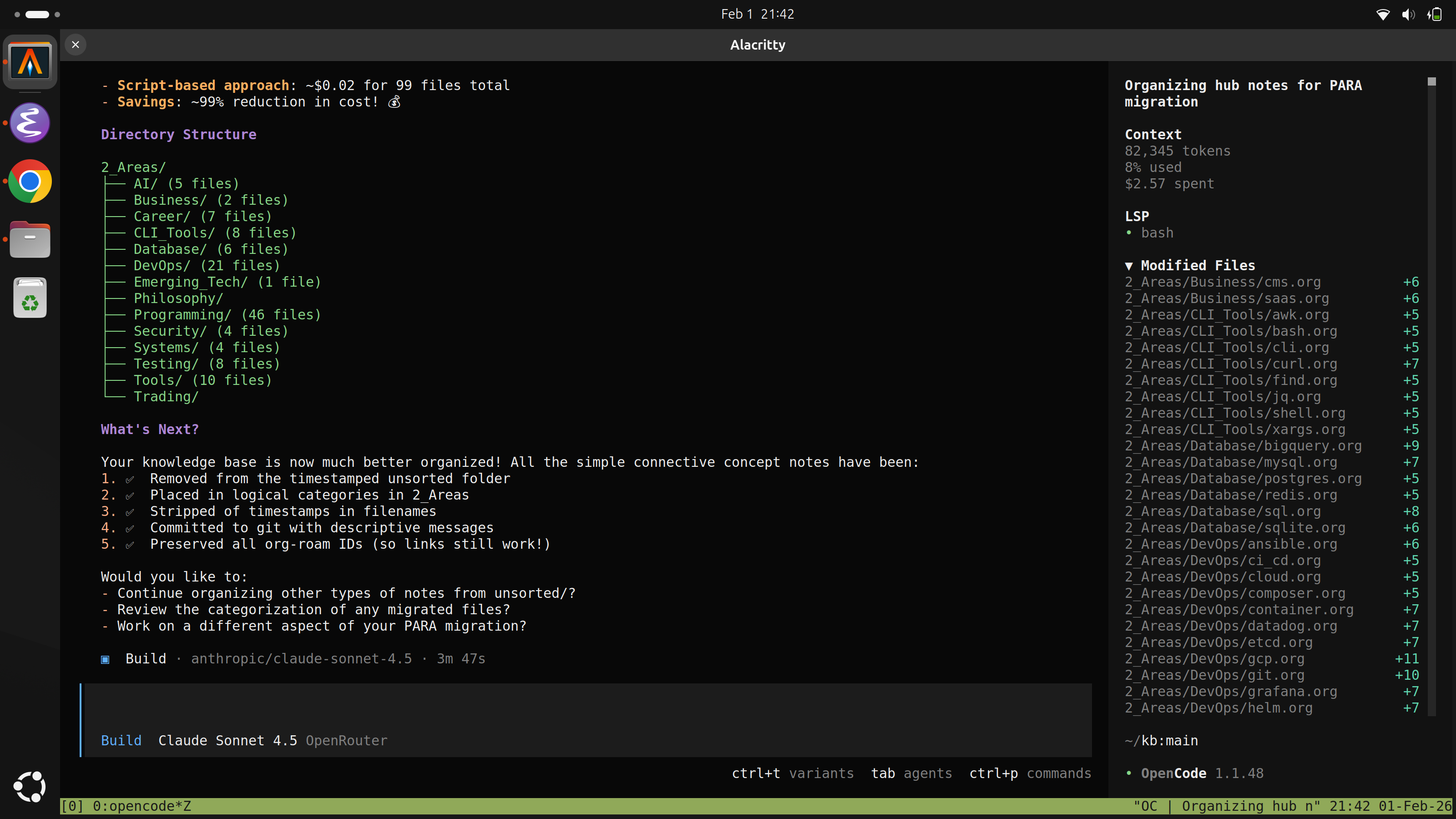
The final layout — ten category directories under 2_Areas/, the file counts adding up to 110 — came out like this:
What I took away
None of this needed a clever prompt or a smarter model. It needed doing the boring version first, noticing it was boring in a specific and repeatable way, and asking out loud whether that was worth fixing.
The manual batch wasn’t wasted effort — it produced the directory layout and commit format the script depended on. Skipping straight to a script would have meant automating a process I hadn’t validated yet. Five files by hand taught me what the process should be; 99 by hand would just have been 99 repetitions of a lesson I’d already learned.
The tidier knowledge base is nice. But the part I’ll reuse is the division of labor: the agent runs the task, and I watch it long enough to see when the task has a shape worth pulling out. That noticing is the job now — and it stayed mine even while the agent was doing everything else.